Prepared form
A new client. A clear starting point.
- Company
- Northstar Studio
- Service
- Website launch
- Project budget
- €18,000
Request received
For teams of 10–200 people
Forms collect the details, tables keep the record, and automations hand the work to the right person. Describe the process in plain words: AI drafts it, and nothing runs until you check it.
Free to start · no card required
A new client. A clear starting point.
Website launch
From request to kickoff
AI drafts the flow. You review before activation.
Ready for kickoff.
NS-240Website launch
Prepare kickoff brief
Operations
Schedule discovery
Account team
Context travels with the work.Project code included. Two tasks assigned. Request marked Ready.
One project record. Two assigned tasks. A request marked Ready.
What's inside
Collect inputs with forms, organize records in tables and connect them to follow-up tasks through automations. Approvals are also available for requests that need a human decision.
Collect inputs with shareable forms.
Keep operational data in structured records.
Connect triggers, conditions and actions.
Turn matching records into follow-up work.
Email, Slack, HTTP requests, and webhooks for the steps around a request.Integrations
How it works
Start from a plain sentence. Check every rule in the visual editor, test it, then switch it on.
Tell AI what starts the process, which data matters and what should happen next. Use the draft as your starting point.
Inspect triggers, conditions and actions in the visual editor. Choose the fields and rules that fit your process.
Try your configured workflow, inspect the result and activate when it is ready. Use execution history to follow what ran.
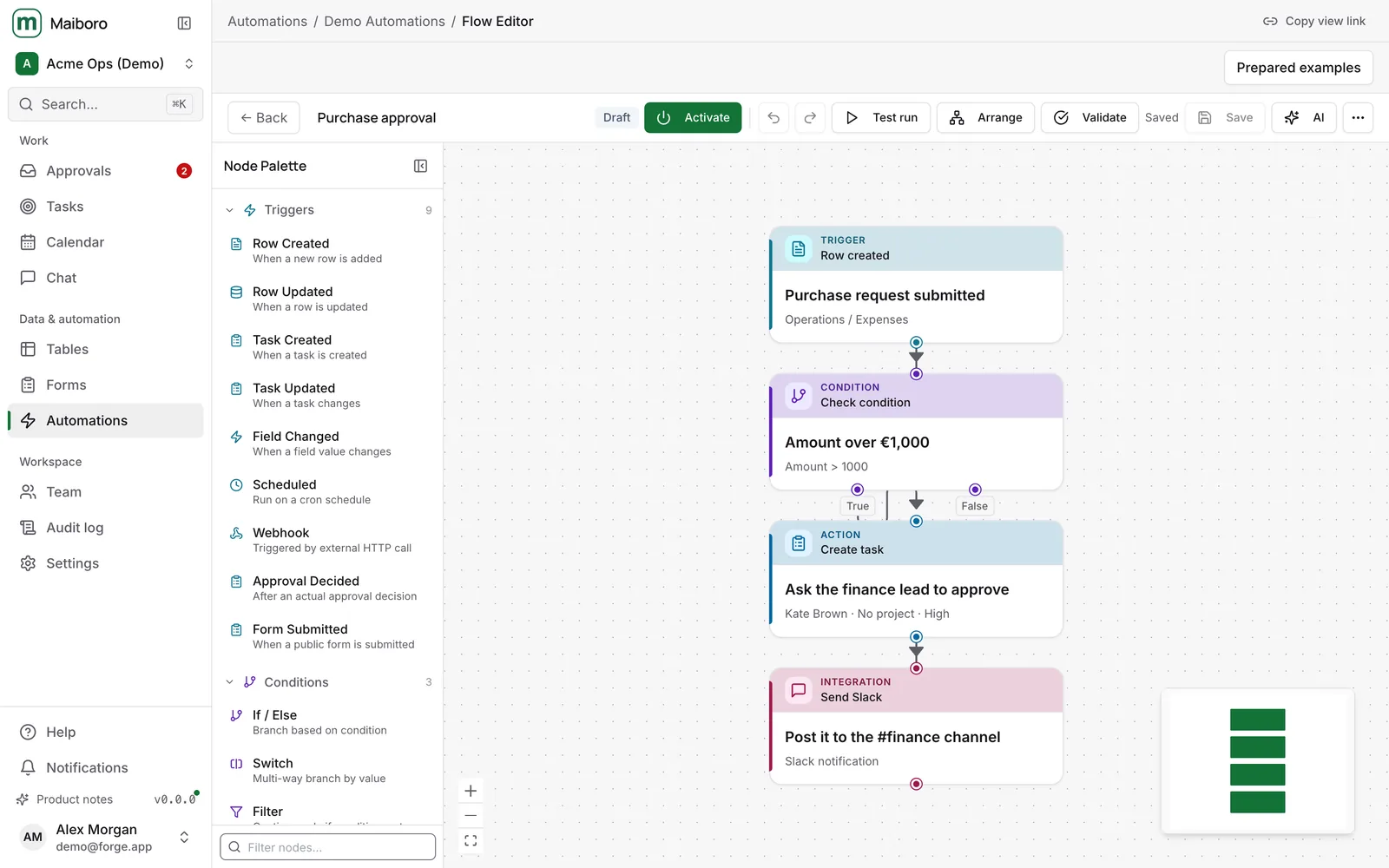
Keep the important details in view. Set the conditions, map the record fields and decide what the next task should contain.
Inspect the selected condition and the action it leads to. Your configured rules determine what runs.
Examples
Pick an example to see how a request turns into the next task. All data is made up.
Purchase request submitted
Amount over €1,000
€2,400 > €1,000 · approval neededThe amount is over €1,000
Approve: new laptop for the Design team
The finance lead sees the amount, the reason and who asked.
When a purchase request over €1,000 comes in, send it to the finance lead for approval.
The product
Real screens from the app with made-up demo data.
FAQ
What to expect when you start using Maiboro.
It's free to start, and you don't need a card. There are no automatic charges.
Main workspace data and backups are stored in the EU. Inside the workspace, roles decide who can see and change tables, forms and workflows. The privacy policy lists the services that process data.
The AI is used only when you ask it for a draft. It never switches anything on: a person reviews and activates every workflow.
Start from an example or describe your own process in a sentence. The draft opens in the visual editor, where you adjust it and run a test before switching it on.
Yes. Import a CSV file into a table, then build forms and workflows around it.
Email over SMTP, Slack through Incoming Webhooks, HTTP requests, and inbound and outbound webhooks. There is no catalogue of ready-made app connectors yet.
Nothing runs until you switch it on. You can change any step by hand in the visual editor, test it, and check every run in the history.
Yes. Tables and workflows can be exported at any time. The privacy page explains how to ask for a copy or deletion of personal data.
I'm building Maiboro because small teams lose hours copying details between forms, spreadsheets and chats, and chasing people for the next step. I want those handoffs to happen on their own, with a person still deciding what runs. If your team needs something that isn't here yet, write to me.
— Maksym Maiboroda, founderContact
Pick an example or describe your own. It's free to start, and nothing runs until you switch it on.
Create a free workspace